Refund A Payment
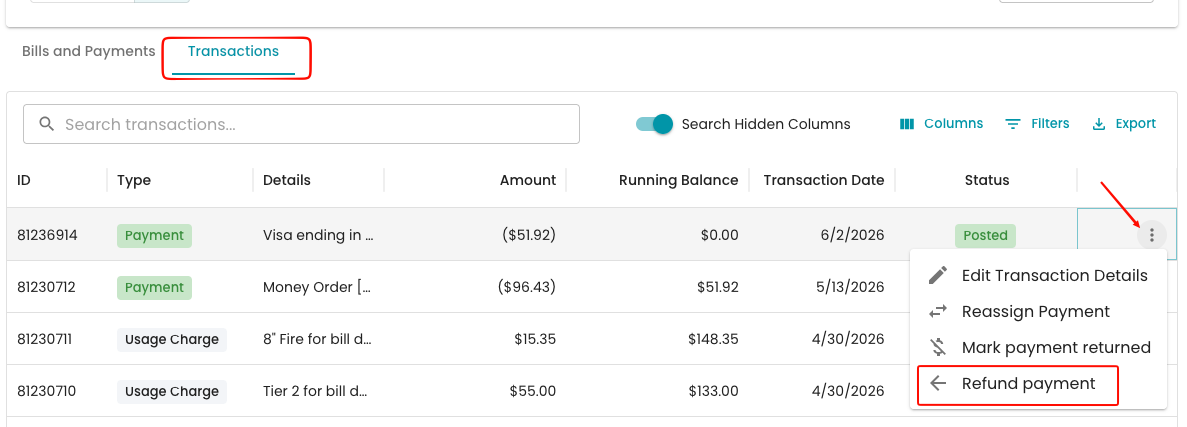
If a payment needs to be refunded, you can do so by navigating to the Transactions section in the account >Look for the Payment > Select the three dots > Refund payment.
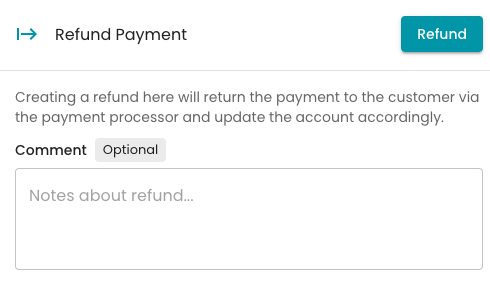
You will be prompted with an option to add a comment to the refund for record-keeping.
Lastly, the adjustment will appear in the Transactions section as in progress, with the original payment marked as adjusted.

Refund statuses
After you submit, a refund transaction labeled "Full refund for $X payment" appears on the account. It moves through these statuses:
| Status | What it means | What you see in the Refund Payment panel |
|---|---|---|
| In Progress | Sent to the processor and waiting for confirmation | "A refund for this transaction is being processed." with the refund ID |
| Posted | The processor confirmed the refund and the account is updated | "This transaction was already refunded." with the refund ID |
| Failed | The processor couldn't complete the refund | The Refund button is available again |
A refund stays In Progress until the processor confirms it. Any processing fee from the original payment is returned too, with an offsetting entry so it doesn't change the customer's balance.
Retrying a failed refund
If a refund fails, either right away with a "Failed to refund payment" message or later while processing, you can try again:
- Check the reason in the error message, and fix it if you can.
- Open the payment's three-dot menu and choose Refund payment again.
- Click Refund and confirm.
The failed refund stays on the account for your records. Only the new refund returns money to the customer.
FAQ
I don't see Refund payment. It's only available to admins, and only for card or bank payments made through the payment processor. Cash and check payments don't have it.
The Refund button is grayed out. A refund for this payment is already processing or complete. The panel shows the refund ID.
Can I refund part of a payment? No. Refunds here are always for the full payment amount.
Can I retry a refund that failed? Yes. Open Refund payment again and resubmit. Only refunds that are processing or complete block a new one.
When will the customer get their money? That depends on their card issuer or bank. The refund shows as Posted once the processor confirms it.