Receiving One Combined Bill for Multiple Accounts (Group Billing)
If you manage more than one utility account, for example a few rental properties or multiple service locations, you can choose to receive one email with a single combined PDF covering all of your bills, instead of a separate email for each account.
This only changes how your bills are delivered. It doesn't change your rates, charges, due dates, or balances. Each account is still billed separately behind the scenes.
Note: this requires your Customer Portal profile to be linked to more than one account, and applies to email bills only (not paper bills).
How to Enable It
- Log in to the Customer Portal.
- Go to Profile Settings > Notifications.
- Under "Settings for all statements," check "Group bills into single email."
- Click Save Changes.
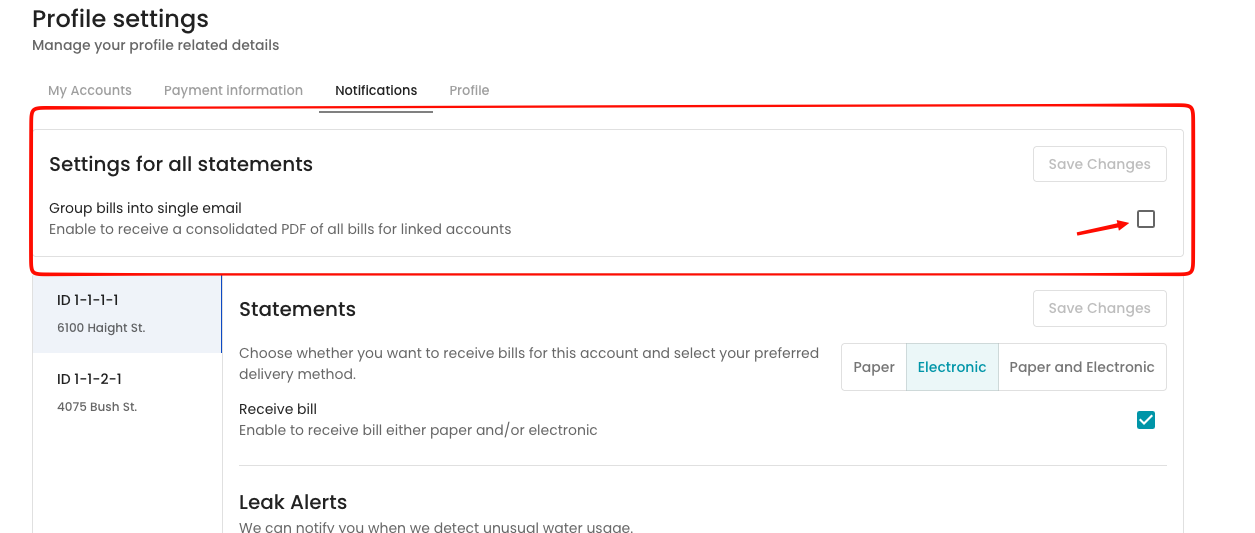
Starting with your next billing cycle, you'll get one combined email instead of separate ones. To turn it off, uncheck the box the same way.
FAQ
I only have one account. Can I still turn this on? You can, but it won't do anything since there's only one bill to send.
Will this change how much I owe or when it's due? No. It only changes delivery. Charges, due dates, and balances stay the same.
Can my utility provider turn this on for me? Yes, contact your utility provider and they can enable it on your behalf.